
GEP-0031: In-Place Node Updates of Shoot Clusters
Table of Contents
- GEP-0031: In-Place Node Updates of Shoot Clusters
Summary
Gardener should support new update strategies for nodes that do not require the deletion and recreation of the nodes. These strategies aim to minimize the overhead traditionally associated with node replacement and offer an alternative approach to updates, which is particularly important for physical machines or bare-metal nodes.
The in-place update strategy is not intended to replace the current rolling update strategy provided by the machine-controller-manager. Instead, it offers an alternative that is especially useful in situations where physical machines or bare metal nodes are involved (manually joined or programmatically provisioned) that cannot be rolled easily. Additionally, this update strategy can be useful in scenarios where rolling machines is undesirable, such as when dealing with large machines or limited resources on the cloud provider.
Motivation
In Gardener, certain changes to the worker pool configuration trigger a rolling update, during which nodes in the worker pool are replaced. This process involves creating new nodes with the updated configuration while systematically deleting the old ones. A comprehensive list of changes that initiate a rolling update is documented under Rolling Update Triggers.
This process presents challenges for physical machines or bare-metal nodes, which are not as interchangeable as virtual machines because of factors such as:
- Long boot times: Physical machines often have longer boot processes, especially when running Power-On Self-Tests (POST), such as memory checks, unless they are fully booted already and can fast-boot.
- Slow cleanup/sanitization: Erasing data from physical machines can take significant time before they can be repurposed or returned to a resource pool.
- Locally attached storage: Physical machines often have locally attached disks, which cannot be easily moved or re-attached to other machines, unlike network-attached volumes in virtual environments.
- Limited interchangeability: Physical machines are typically larger in size, fewer in number, and not as easily replaced or repurposed as virtual machines, making their replacement more challenging.
In addition, this process also presents challenges for virtual machines, e.g. if the virtual machine type is scarce (in general or because of an ongoing capacity crunch) or if certain scarce resources are connected/attached, e.g. GPUs that may not be available for additional or even replaced machines once released (as other customers are waiting for them). To address this, we aim to support new update strategies that do not require the deletion and recreation of nodes, reducing the need for node replacement, especially in environments with limited physical resources. Additionally, there are scenarios where users want control over node updates, allowing them to select specific nodes to be updated. Our goal is to support a new way to update these dependencies that avoids node deletion and recreation, while also giving users the flexibility to orchestrate (=trigger) updates themselves as they see fit, e.g. after executing custom pre-update checks.
Goals
- Provide functionality to support updating nodes in-place for rolling update triggers listed under Rolling Update Triggers except the following:
.spec.provider.workers[].machine.image.name.spec.provider.workers[].machine.type.spec.provider.workers[].volume.type.spec.provider.workers[].volume.size.spec.provider.workers[].cri.name.spec.systemComponents.nodeLocalDNS.enabled
- Provide two strategies for in-place -
AutoInPlaceUpdateandManualInPlaceUpdate. The former will be orchestrated by themachine-controller-managerand the latter by the users themselves. - Switching between
AutoInPlaceUpdateandManualInPlaceUpdatestrategies.
Non-Goals
- Provide a way to schedule the pods on the same node after the in-place update.
- Downgrading of Kubernetes/machine image version after successful update.
- Switching between in-place and rolling update strategies.
- Provide an update strategy without draining the node.
- Provide in-place updates only for the Kubernetes version in worker pools where the OS does not support in-place updates.
Proposal
In short, Gardener should support new update strategies that do not require deleting and recreating the node when a rolling update trigger occurs except in cases where the underlying hardware, such as the machine type, or critical software components, like the container runtime (CRI), are being modified.
Approach
The machine-controller-manager and gardener-node-agent components will be used to perform in-place updates. machine-controller-manager will provide an interface that prepares the machine/node for an update. This interface can be used by other components to determine if a node is ready for an update, allowing the other component to perform the update on the node and then notify the machine-controller-manager that the node is successfully updated. In the case of Gardener, this component will be the gardener-node-agent.
This design was chosen to leverage the machine-controller-manager's node rollout orchestration functionality while ensuring that it remains a standalone component.
Prerequisites
To perform an in-place OS update, the following prerequisites must be met:
- The node's machine image or operating system must support in-place updates, providing a tool or utility to initiate the update process.
- The update mechanism should ensure reliability by:
- Booting into the new version upon a successful update.
- Falling back to the previous version in case of failure.
Additionally, the update tool or utility may offer configuration options, such as:
- Retry Configuration: The ability to define the number of retries for the update process.
- Registry Configuration: The option to specify the registry from which the OS image is pulled.
Update Strategies
Gardener will introduce two additional update strategies, AutoInPlaceUpdate and ManualInPlaceUpdate, for worker pools, in addition to the existing rolling update which will be now named as AutoRollingUpdate strategy. In the future, there could also be ManualRollingUpdate which could give more control to the users in rolling updates as well. The two new strategies are described as follows:
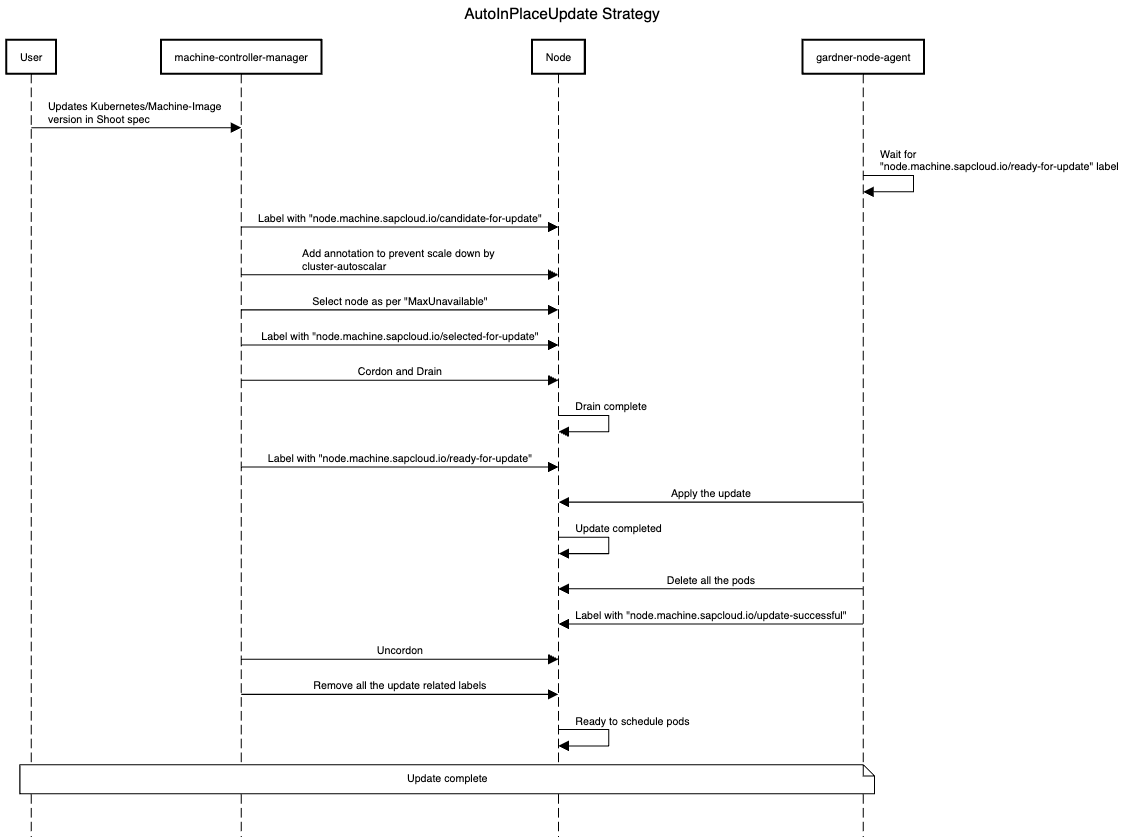
AutoInPlaceUpdate strategy
- On a shoot spec change for a worker pool,
machine-controller-managerwill label all nodes of the updated worker pool with thenode.machine.sapcloud.io/candidate-for-updatelabel. This label is used to identify nodes that require an update. machine-controller-managerwill add the necessary annotation to the nodes to prevent them from being scaled down bycluster-autoscalerduring the update process.machine-controller-managerwill select as many nodes as are permitted by themaxUnavailablesetting for the worker pool and label it/them withnode.machine.sapcloud.io/selected-for-update. This label can be used to identify nodes that are about to or are currently undergoing an update.machine-controller-managerwill cordon and drain the node/nodes and label it/them with thenode.machine.sapcloud.io/ready-for-updatelabel once the drain is completed.gardener-node-agentwill detect thenode.machine.sapcloud.io/ready-for-updatelabel and perform the update on the machine. It will wait for the update to complete (with a specified timeout).- Once the machine is updated,
gardener-node-agentwill delete all the pods in the node so that they will get recreated and the node will be labelled by thegardener-node-agentwith thenode.machine.sapcloud.io/update-successfullabel. machine-controller-managerwilluncordonany node with thenode.machine.sapcloud.io/update-successfullabel and remove this and all other update-related labels. Once the node becomesReady, it can host workload again.
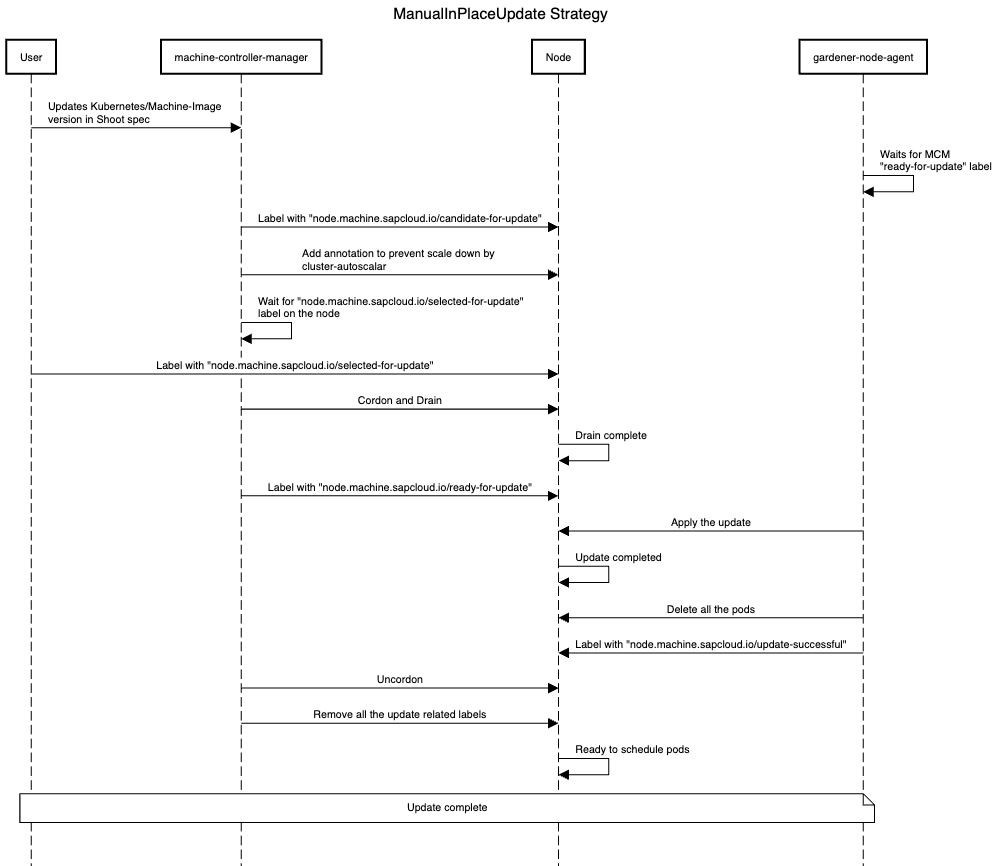
ManualInPlaceUpdate strategy
- On a shoot spec change for a worker pool,
machine-controller-managerwill label all nodes of the changed worker pool with thenode.machine.sapcloud.io/candidate-for-updatelabel. This label is used to identify nodes that require an update. machine-controller-managerwill add the necessary annotation to the nodes to prevent them from being scaled down bycluster-autoscalerduring the update process.machine-controller-managerwill wait for thenode.machine.sapcloud.io/selected-for-updatelabel on the node. The user is solely responsible for orchestrating the update and is free to select the nodes to be updated at will.- Once the user adds the
node.machine.sapcloud.io/selected-for-updatelabel, steps 4-7 of theAutoInPlaceUpdatestrategy will be performed.
A new optional constraint will be introduced in the Shoot status to indicate that some worker pools are undergoing a manual in-place update. Although the Shoot will be marked as successfully reconciled, these worker pools might remain outdated. Furthermore, a field (can be called pendingWorkersInPlaceUpdate) will be introduced in the Shoot status to track worker pools awaiting in-place updates.
Subsequent updates to the worker pool will be blocked by validation if an in-place update is already in progress. This ensures that worker pools do not skip intermediate Kubernetes minor versions or machine image versions. However, if an in-place update fails and a fix - such as a patch to the current updated minor version - is required, it will be allowed, if the Shoot has the shoot.gardener.cloud/force-in-place-update: true annotation.
Gardener
CloudProfile API
A new field, inPlaceUpdateConfig, has been added under .spec.machineImages[].versions[] in the CloudProfile resource. This field includes two subfields:
supportedindicates whether this machine image version supports configuring in-place update strategies in the Shoot.minVersionForUpdatespecifies the minimum machine image version required to perform direct in-place upgrades to this version.
If the supported field is set to false or the current version is below the value specified in minVersionForUpdate, validation will disallow the update.
apiVersion: core.gardener.cloud/v1beta1
kind: CloudProfile
metadata:
  name: cloudprofile1
spec:
  type: <some-provider-name>
  providerConfig: <some-provider-specific-cloudprofile-config>
  kubernetes:
    versions:
      - version: 1.31.1
  machineImages:
    - name: gardenlinux
      versions:
        - version: 1443.8.0
          expirationDate: "2025-02-28T23:59:59Z"
          inPlaceUpdateConfig:
            supported: true # true/false
            minVersionForUpdate: 1312.3.0
        - version: 1443.7.0 # if minVersionForInPlaceUpdate is not specified, in-place update cannot be performed on this version
  machineTypes:
    - name: m5.large
      cpu: "2"
      gpu: "0"
      memory: 8Gi
      usable: true
  regions:
    - name: <region-name>
Shoot API
A new field updateStrategy is introduced under spec.provider.workers[] in the Shoot spec. This field will be passed on to the worker extension. Once set, changing the updateStrategy from an in-place strategy to a replace strategy and vice versa is prohibited through validation. Additionally, when AutoInPlaceUpdate or ManualInPlaceUpdate is configured as an update strategy, skipping an intermediate Kubernetes minor version is no longer allowed, because of potential breaking changes that are then not carried out anymore when skipping versions (only allowed with AutoRollingUpdate as the machines/nodes are created from scratch in this case).
apiVersion: core.gardener.cloud/v1beta1
kind: Shoot
metadata:
  name: crazy-botany
  namespace: garden-dev
spec:
  secretBindingName: my-provider-account
  cloudProfile:
    name: cloudprofile1
  region: europe-central-1
  provider:
    type: <some-provider-name> # {aws,azure,gcp,...}
    workers:
      - name: cpu-worker
        minimum: 5
        maximum: 5
        maxSurge: 0
        maxUnavailable: 2
        updateStrategy: AutoInPlaceUpdate # AutoRollingUpdate/AutoInPlaceUpdate/ManualInPlaceUpdate, defaulted for now to AutoRollingUpdate
        machine:
          type: m5.large
          image:
            name: <some-image-name>
            version: <some-image-version>
          architecture: <some-cpu-architecture>
        providerConfig: <some-machine-image-specific-configuration>
  kubernetes:
    version: 1.27.3
  networking:
    type: <some-network-extension-name> # {calico,cilium}
Worker API
New field updateStrategy and kubelet are introduced under .spec.pools[] in the Worker API. The updateStrategy field will be used to set the machineDeploymentStrategy for the machinev1alpha1.MachineDeployment resource and kubelet field corresponds to the kubelet configuration for this worker pool.
apiVersion: extensions.gardener.cloud/v1alpha1
kind: Worker
metadata:
  name: worker
  namespace: shoot--foobar--aws
spec:
  type: aws
  region: eu-west-1
  secretRef:
    name: cloudprovider
    namespace: shoot--foobar--aws
  infrastructureProviderStatus: <infra-status>
  pools:
    - name: cpu-worker-1
      machineImage:
        name: gardenlinux
        version: 1.2.2
      minimum: 5
      maximum: 5
      maxSurge: 0
      maxUnavailable: 2
      updateStrategy: AutoInPlaceUpdate # AutoRollingUpdate/AutoInPlaceUpdate/ManualInPlaceUpdate
      kubelet:
        evictionHard:
          memoryAvailable: 100Mi
          imageFSAvailable: 5%
OperatingSystemConfig API
New fields osVersion, kubeletVersion, and credentialsRotation are introduced in the OperatingSystemConfig spec and inPlaceUpdates in the OperatingSystemConfig status.
osVersionspecifies the machine image version.kubeletVersionspecifies the version of the kubelet.credentialsRotationcontains two subfields:certificateAuthoritiescontainslastInitiationTimewhich records the timestamp of the most recent Certificate Authority (CA) rotation initiation.serviceAccountKeycontainslastInitiationTimewhich records the timestamp of the most recentServiceAccountsigning key rotation initiation.
- The inPlaceUpdates field has following subfields:
osUpdate.commandspecifies the command responsible for performing machine image updates. The command can invoke either an inbuilt utility/tool or a custom script.osUpdate.argsprovides a mechanism to pass additional arguments or flags to the update script, like the target version or the OCI registry from which the updated machine image should be pulled, offering flexibility tailored to the needs of different OS extensions.
apiVersion: extensions.gardener.cloud/v1alpha1
kind: OperatingSystemConfig
metadata:
  name: pool-01-original
  namespace: default
spec:
  type: gardenlinux
  osVersion: 1631.0
  kubeletVersion: 1.30.4
  credentialsRotation:
    certificateAuthorities:
      lastInitiationTime: "2024-01-01T12:30:00Z"
    serviceAccountKey:
      lastInitiationTime: "2024-01-01T12:30:00Z"
  units:
    - ...
  files:
    - ...
status:
  inPlaceUpdates:
    osUpdate:
      - command: /opt/gardener/bin/inplace-update.sh
      - args:
        - --version
        - 1631.0
        - --repo
        - <someOCIregistry>
Gardener Node Agent
The gardener-node-agent will function as the component responsible for carrying out in-place updates on the node.
Currently, when a dependency in the Operating System Configuration (OSC) changes, gardener-node-agent detects the differences between the current OSC and the last applied OSC and updates any modified units on the node. When the in-place update strategy is configured, if changes are detected that cannot be applied immediately (ie; if the change contains any of the update triggers listed in the Goals), gardener-node-agent will pause the update and wait for the node.machine.sapcloud.io/ready-to-update label to appear on the node before proceeding with the update.
For machine image updates, gardener-node-agent executes the command present in the inPlaceUpdates.osUpdate field within the OperatingSystemConfig status.
For Kubelet minor version or configuration updates, gardener-node-agent will apply the changed files and restart the kubelet unit and there are no additional steps involved.
For credential rotation, in the case of Certificate Authority (CA) rotation, the kubelet needs to be bootstrapped again so that it can request client certificates signed by the new CA. gardener-node-agent will use the existing kubeconfig used by the kubelet (passed in the --kubeconfig flag. See kubelet Options) and use it as bootstrap kubeconfig (--bootstrap-kubeconfig flag in the kubelet). It will remove the kubelet certificate directory (--cert-dir flag in the kubelet) /var/lib/kubelet/pki, and the kubelet.service unit is restarted. This makes the kubelet request new client certificates through Certificate signing requests (CSR). In case of ServiceAccount signing key rotation, gardener-node-agent will fetch the new service account token using its token controller automatically.
After executing an update, gardener-node-agent will determine the outcome and apply the corresponding label to the node: either node.machine.sapcloud.io/update-successful or node.machine.sapcloud.io/update-failed, indicating the status of the update. In the case of a successful update, before labelling the node as node.machine.sapcloud.io/update-successful, the gardener-node-agent will restart all pods running on the node. This step ensures that DaemonSet pods and pods with local storage are properly recreated post-update.
Machine Controller Manager
The machine-controller-manager acts as an orchestrator for the update, ensuring changes are rolled out in a controlled manner.
In the current implementation, when there is a change which triggers a rolling update, the provider extension creates a new MachineClass, and the MachineDeployment is updated to reference this new MachineClass. machine-controller-manager detects this change and creates a new MachineSet with the new MachineClass and machines are rolled out based on the RollingUpdate strategy in the MachineDeployment spec. In the case of the RollingUpdate strategy, new machines are created in the new MachineSet using the new MachineClass, and the old ones are deleted from the old MachineSet. For in-place updates, instead of creating new machines for the new MachineSet, the old ones are moved from the old MachineSet to the new one after the gardener-node-agent has successfully performed the update. This process preserves the old machines (their Machine and Node resources).
There are two ways to achieve this:
- Owner Reference Update: Move the old
Machineto the newMachineSetby updating the owner reference. The downside of this method is that theMachinename will stay the same through updates, which breaks the current naming convention of including theMachineSetname as a prefix in theMachinename. - Shallow Delete: Instead of directly moving a
Machinefrom oneMachineSetto another, first perform a shallow delete of the oldMachineobject (without deleting the underlying physical/virtual machine), then create a newMachineobject in the newMachineSet(for the same physical/virtual machine).
NOTE
At the time of writing this GEP, it is undecided which method to proceed with. The first method has been evaluated, but the feasibility of the second method is yet to be assessed. If feasible, the second method is preferred.
MachineDeployment API
A new strategy type InPlaceUpdate and a new field, inPlaceUpdate, are introduced under the .spec.strategy field. inPlaceUpdate can be configured when the selected strategy type is InPlaceUpdate.
apiVersion: machine.sapcloud.io/v1alpha1
kind: MachineDeployment
metadata:
  name: <name>
  namespace: <shoot-namespace>
spec:
  replicas: 1
  selector:
    matchLabels:
      name: <label>
  strategy:
    inPlaceUpdate:
      maxUnavailable: 1
      maxSurge: 0
      orchestrationType: auto # auto/manual
    type: InPlaceUpdate # RollingUpdate/InPlaceUpdate/Recreate, defaulted to RollingUpdate
  template: {}
    spec: {}
status: {}maxUnavailable: Specifies the maximum number of unavailable machines during the update process. Any machine undergoing an in-place update or with an update failed will be counted as unavailable.
maxSurge: Specifies the maximum number of machines that can be scheduled above the desired number of machines. Set maxSurge to zero if you don't want any new machines/nodes to be provisioned during the update. You can set it to a value greater than zero if you like to avoid pending pods because of lack of capacity during the update; in that case, first new machines/nodes will be created with the updated configuration and then the old machines/nodes will undergo in-place updates.
orchestrationType: Indicates the type of update orchestration. If the update strategy in the worker specification is set to ManualInPlaceUpdate, the worker controller will assign the value manual to this field; otherwise, it will be set to auto.
Dependency Watchdog
Currently, the dependency-watchdog monitors the leases of the nodes in the shoot cluster. If more nodes than a configured threshold are unhealthy, it scales down the machine-controller-manager, kube-controller-manager, and cluster-autoscaler to prevent a meltdown. During an ongoing in-place update, DWD can make use of the labels added by the machine-controller-manager during in-place update to exclude nodes undergoing updates from its health check.
Extensions
OS extensions
The OS extensions are responsible for populating the inPlaceUpdates field within the OperatingSystemConfig status. This configuration specifies the command to be executed by the gardener-node-agent to perform the update. The command could be invoking an inbuilt utility/tool or a custom script.
Worker pool hash calculations
The worker pool hash calculation is derived from the rolling update triggers detailed here.
For in-place updates, the following fields are excluded from the hash calculation to ensure that the secret name for the gardener-node-agent remains unchanged:
.spec.kubernetes.versionor.spec.provider.workers[].kubernetes.version.spec.provider.workers[].machine.image.version.status.credentials.rotation.{certificateAuthorities,serviceAccountKey}.lastInitiationTime.spec.kubernetes.kubelet.{kubeReserved,systemReserved,evictionHard,cpuManagerPolicy}or.spec.provider.workers[].kubernetes.kubelet.{kubeReserved,systemReserved,evictionHard,cpuManagerPolicy}
However, these fields are included in the WorkerPoolHashV2 function to ensure changes to the MachineClass are properly reflected.
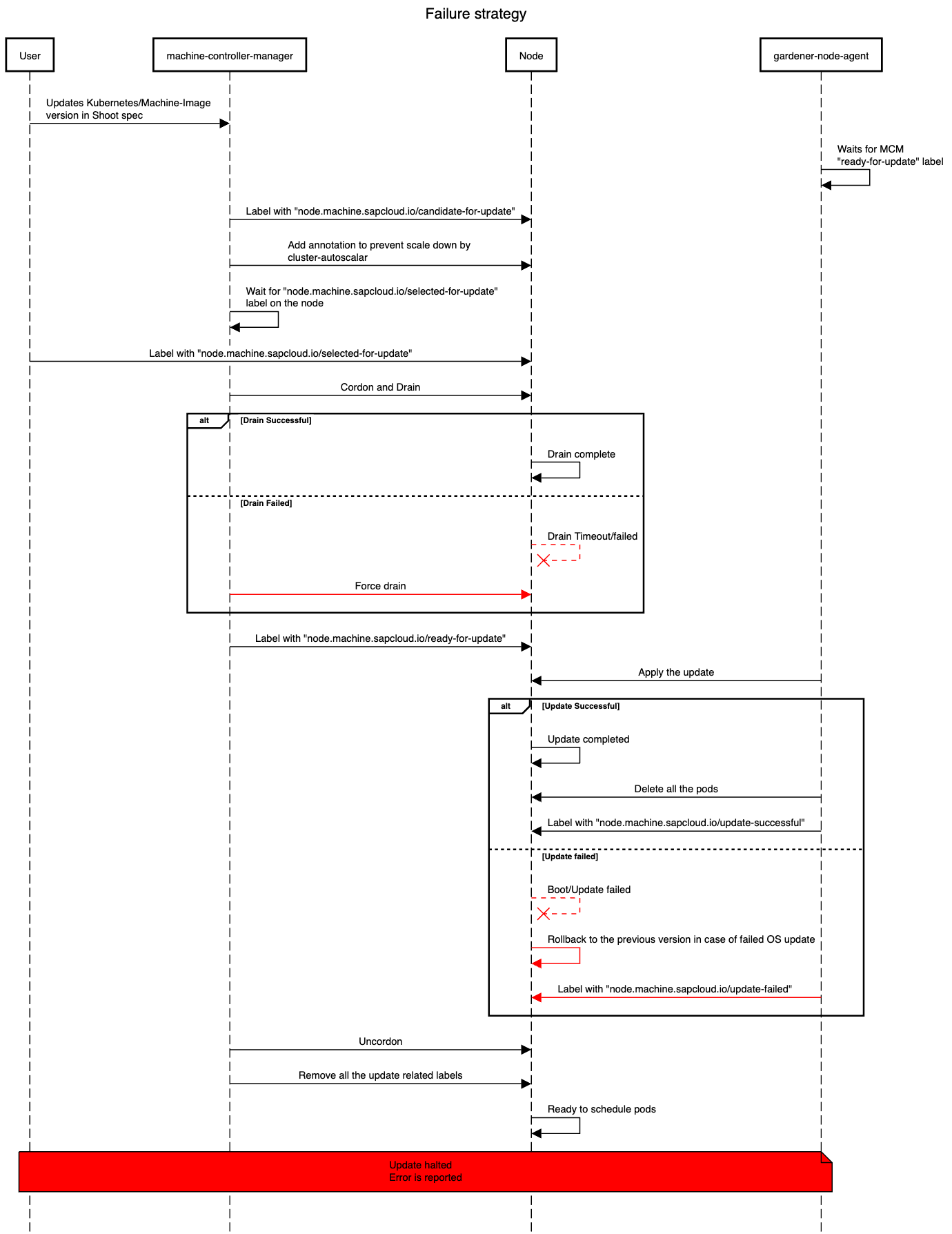
Failures and Recovery Strategy
In-place updates may fail because of several factors ranging from network issues to compatibility problems. This section outlines the failure scenarios, error classifications, and the specific roles gardener-node-agent and machine-controller-manager play in failure handling and recovery to ensure minimal disruption. The error will be reported in the node.machine.sapcloud.io/update-failure-message annotation on the node which can be used subsequently by the Shoot care controller.
Types of Failures During Update
Drain Timeout/Failure
- A node is marked as
node.machine.sapcloud.io/ready-for-updateonly after a successful drain. - We use the existing drain logic provided by the
machine-controller-manager. - If a drain operation times out or fails, the node will be forcefully drained.
Kubernetes Update Failures
- Update Halt on Failure:
gardener-node-agentwill label the failed node with annode.machine.sapcloud.io/update-failedlabel. This label signalsmachine-controller-managerto stop further updates when the number of unhealthy machines reaches configuredmaxUnavailable.
OS Update Failures
- Before rebooting for update - Update cannot start if the machine image version is unavailable, network issues prevent the image pull, or disk storage is insufficient (although proper garbage collection should prevent this); classified as retriable or non-retriable.
- Failed to boot the new OS - If the node fails to boot into the new OS version and reverts to the previous version,
gardener-node-agentwill annotate it to mark an update attempt, but the root cause may remain unlogged as filesystems mount later in the booting process; classified as non-retriable. - Total failure - In cases where the system fails to boot into either of the OS versions, the update attempt will timeout and be marked as failed; classified as non-retriable.
Roles in Failure Handling
gardener-node-agent:
gardener-node-agent is responsible for initiating updates, with specific timeouts set for Kubernetes and machine image updates. When an error occurs it will be classified as follows:
- Retriable Error: Temporary errors, such as network interruptions, prompt
gardener-node-agentto retry the update after a delay. Retriable error will also get classified as non-retriable error after a certain number of retries andgardener-node-agentlabels the node with annode.machine.sapcloud.io/update-failedlabel. - Non-Retriable Error: For critical issues, such as incompatible OS versions,
gardener-node-agentlabels the node with anode.machine.sapcloud.io/update-failedlabel.
machine-controller-manager:
machine-controller-manager prepares nodes for updates by adding the node.machine.sapcloud.io/ready-to-update label and waits for gardener-node-agent to perform the update. machine-controller-manager monitors for status labels applied by gardener-node-agent:
- Timeout Handling: After the
machine-controller-manageradds thenode.machine.sapcloud.io/ready-for-updatelabel to a node, it waits for thegardener-node-agentto complete the update within the timeout configured inmachine-controller-manager. The timeout on themachine-controller-managerside is essential for handling cases wheregardener-node-agentfails to report any status, such as during a total failure of the OS update. If the update is unsuccessful after a certain number of retries,machine-controller-managerwill add thenode.machine.sapcloud.io/update-failedlabel to the node. - Failed Update Handling: If the nodes labeled with
node.machine.sapcloud.io/update-failedreaches configuredmaxUnavailable,machine-controller-managerstops further updates. The failed machines remain with the oldMachineSet, and no additional machines in thatMachineDeploymentwill be updated until the nodes with thenode.machine.sapcloud.io/update-failedlabel are fixed. The failure is propagated to the shoot status, notifying the operator or user, who may need to investigate the issue manually. To resolve the issue, the error must be fixed manually, and thenode.machine.sapcloud.io/update-failedlabel should be removed from the node. This allows themachine-controller-managerto proceed with the update process.
NOTE
All mentioned timeouts and retries are subject to change, with exact values to be decided during implementation.
Future Work
- Support node updates without draining the scheduled pods first/at all.
- Allow to switch the update strategy from
AutoRollingUpdatetoAutoInPlaceUpdate/ManualInPlaceUpdateor vice-versa. - Evaluate whether nodes can consistently be updated in-place for supported update triggers, eliminating the need to offer a choice between in-place and rolling updates.
Alternatives
Using Only Gardener Node Agent
Instead of using both the machine-controller-manager and the gardener-node-agent for in-place updates, use only gardener-node-agent. However, this method has the following drawbacks:
machine-controller-managernatively provides rolling update logic throughMachineDeploymentandMachineSet, which helps track the progress of updated and pending nodes. Additionally,machine-controller-managerincludes logic to select machines based onmaxUnavailable/maxSurge, ensuring machines are rolled in a controlled manner. If onlygardener-node-agentwas used, we would need to implement new logic to track node update progress and to manage the number of nodes updated at a time before proceeding to the next set.machine-controller-manager's drain logic, which offers special handling, cannot be utilized.
Using the same name for MachineClass
As mentioned in the selected approach, the same machine object is transferred from one machine set to another, which would create a naming drift, leading to machine names not having the machine set name as a prefix. To prevent this, an alternative approach was evaluated, where the MachineClass name would not change when the machine image or Kubernetes minor version is updated. This way, no new machine set would be created, and the machine transfer between sets would be avoided, preserving naming consistency. However, this approach has the same disadvantage as the previous one: a new logic would need to be written to track the progress of the rolling update.